
When Fundations is activated it creates seven WordPress pages automatically. Each page contains the correct block markup for its purpose. This is a free feature.
Why use this
Fundations blocks rely on specific pages to host the wizard form, the user dashboard, the claim flow, and the edit form. Creating these manually would require knowing the exact block structure. The auto-installer handles this on first activation.
What it does
Seven pages are created and their IDs stored in options:
| Page title | Default slug | Option key | Purpose |
|---|---|---|---|
| Create Fundations | create-fundations | get_fund_wizard_page_id | Hosts the Action Wizard block |
| Fundations | fundations | get_fund_overview_page_id | Archive/overview of all fundraising pages |
| Fundations Account | fundations-account | get_fund_account_page_id | User account and dashboard |
| Claim Fundations | claim-fundations | get_fund_claim_page_id | Claim ownership of a guest-created action |
| Fundations Checkout | fundations-checkout | get_fund_fundations_checkout_page_id | Product checkout (Pro WooCommerce feature) |
| Edit Fundations | edit-fundations | get_fund_edit_page_id | Frontend editing form |
| Thank You | thankyou-fundations | get_fund_thankyou_page_id | Post-donation thank-you page |
The checkout page is created by the free plugin but its functionality is part of the Pro WooCommerce integration. It will appear as an empty page for free users.
Block templates
Page content is loaded from block HTML files in includes/templates/wordpress/ for all block themes.
How to use it
- Activate the Fundations plugin. The pages are created automatically.
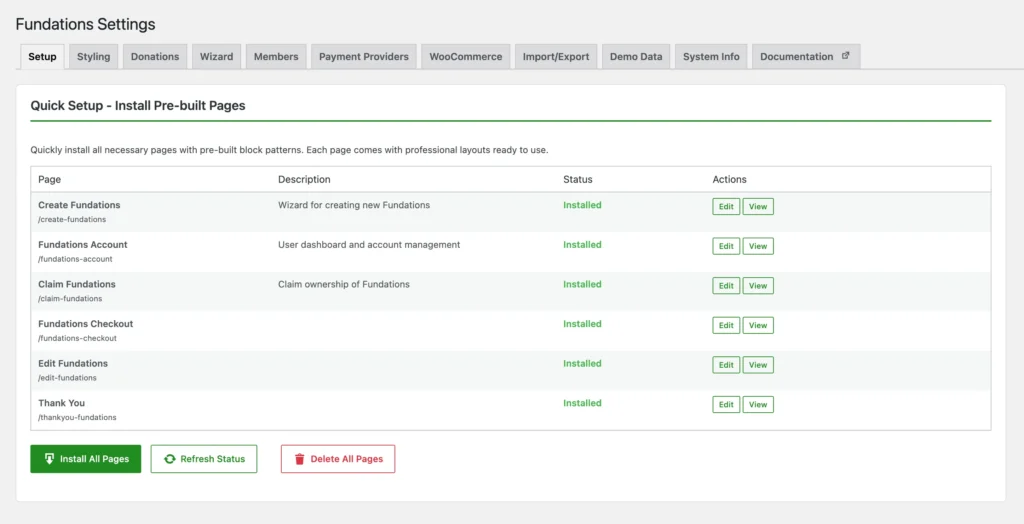
- To verify, go to Fundations > Settings > Pages. Each page shows its current status.
- If a page is missing (deleted or not created), click Install Pages to reinstall.
- After reinstalling, go to Settings > Permalinks and click Save Changes to flush rewrite rules.
Settings and options
Page management is available via the Pages tab in Fundations settings. Actions available per page:
| Action | Effect |
|---|---|
| Install Pages | Creates all missing pages. |
| Reinstall (individual page) | Deletes existing page and recreates it with default block content. |
| Delete (individual page) | Removes the page and clears the stored ID. |
What you can and cannot do
You can edit the auto-created pages in the WordPress block editor after creation, and move any page to a different slug by editing it in Pages. If you accidentally break a page’s content, you can reinstall it from the settings panel.
You cannot change the stored page option IDs from the WordPress Pages list alone. Use the Fundations settings panel so the option is updated alongside the page. The checkout page functionality also requires Pro — it will remain empty without it.
Troubleshooting
Wizard page shows 404. Go to Fundations > Settings > Pages, reinstall the wizard page, then flush permalinks at Settings > Permalinks > Save Changes.
Thank-you page is blank after donation. Check that get_fund_thankyou_page_id points to an existing page. Reinstall the page from settings if needed.
Claim page link in guest email goes to a 404. The claim page ID stored in get_fund_claim_page_id may be incorrect. Reinstall the claim page and confirm the URL in the browser before testing.