
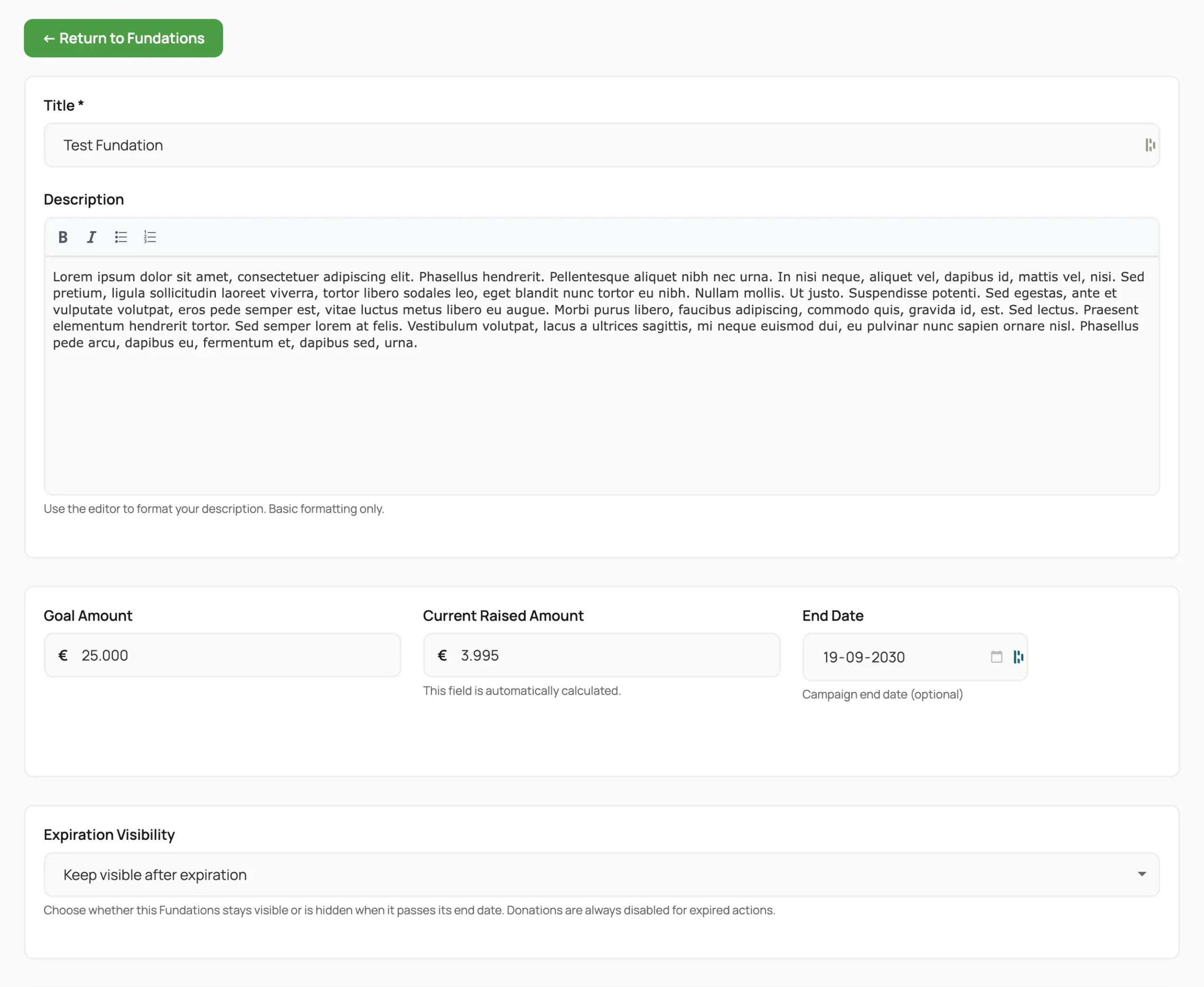
The Frontend Edit form lets fundraising page creators edit their own page from the public-facing site without accessing the WordPress admin. Access is permission-checked and nonce-protected. This is a free feature.
Why use this
Most supporters who create a fundraising page are not WordPress users and should not have access to the admin dashboard. The frontend edit form gives them a dedicated editing experience that matches the public theme.
What it does
The edit form is embedded on the auto-created Edit Fundations page using the [get_fund_edit_form] shortcode. It is accessed via the URL parameter ?edit_fund={post_id} on that page.
The current user must be logged in and either be the post author or have the edit_others_posts capability.
Editable fields
| Field | Notes |
|---|---|
| Title | Required. |
| Description | TinyMCE WYSIWYG editor (bold, italic, lists). Block comments are stripped before display. |
| Goal amount | Currency-formatted. Whole numbers only by default. Converted back on submit. |
| End date | Date picker (YYYY-MM-DD). Can reactivate an expired action if get_fund_expiration_creator_can_extend is true. |
| Featured image | Single file upload via WordPress media handler. |
| Gallery images | Multiple upload. Drag-to-reorder existing images. Delete existing images. Allowed types: jpg, jpeg, png, gif, webp. |
| Creator anonymous | Checkbox controlling whether the creator’s name is shown publicly. |
| Children disabled | Prevents new child actions. Non-admins can set this but cannot unset it. Only admins can re-enable. |
| Expiration visibility | Show/hide/global-default. Only shown when get_fund_expiration_creator_can_choose is true or user is admin. |
| Event assignment | Only shown when get_fund_event_creation is all_users. Uses a Select2 picker with optional new event name. |
| Category assignment | Only shown when Categories are enabled. A Select2 dropdown of existing categories (indented for nesting); select only, never created by the editor. Saved to _get_fund_category_id. |
| Campaign Updates | View, add, edit, and delete campaign updates inline. Each update has its own TinyMCE editor. |
Close fundraiser flow
A Close Fundraiser button opens a modal. The creator can enter an optional closure reason (_get_fund_closure_reason) and closure message (_get_fund_closure_message), then confirm. This sets _get_fund_status to closed and fires get_fund_action_closed. For non-admins this is permanent: a closed action cannot be reopened from the frontend.
Expiration awareness
If the action is expired (checked via Get_Fund_Expiration_Cron::is_action_expired()), a warning banner appears at the top of the form. The message varies based on the effective visibility setting.
How to use it
- The creator visits their fundraising page while logged in.
- They click the Edit button (rendered by the
get-fund/edit-buttonblock). - They are redirected to the Edit Fundations page with
?edit_fund={post_id}in the URL. - They make changes and click Save.
- They are redirected back to the fundraising page.
Settings and options
| Option key | Default | Description |
|---|---|---|
get_fund_edit_page_id | (auto) | Page ID of the frontend edit page |
get_fund_expiration_creator_can_extend | true | Allow creators to set a future end date on an expired action |
get_fund_expiration_creator_can_choose | false | Show the expiration visibility selector in the form |
get_fund_event_creation | admin_only | Set to all_users to show the event field |
What you can and cannot do
Creators can edit any field listed above without admin involvement. You can use hooks to add custom fields or modify saved data. Creators can also reactivate expired actions by extending the end date.
Non-admins cannot re-enable children after disabling them, reopen a closed action, or edit posts by other users without the edit_others_posts capability.
Troubleshooting
Edit button leads to a blank page or 404. Confirm get_fund_edit_page_id points to an existing page with the [get_fund_edit_form] shortcode. Reinstall the page from Fundations > Settings > Pages if needed.
User sees “you do not have permission” message. The user must be logged in and must be the post author. If the user was created as a guest and later claimed the action, confirm the post author was updated to their user ID during the claim process.
Gallery images not saving. The fund_gallery_keep field must contain the comma-separated IDs of images to retain. If the JavaScript reordering fails, all existing images may appear to be deleted. Check for JavaScript errors in the browser console.
TinyMCE not loading. Confirm WordPress scripts are loaded on the edit page. Some performance plugins defer or remove wp-tinymce. Exclude the edit page URL from asset optimisation.
Developer reference
Actions
| Hook | Arguments | Description |
|---|---|---|
get_fund_before_frontend_edit | int $post_id | Fires before the edit form is rendered. |
get_fund_after_frontend_edit | int $post_id | Fires after a successful save. |
get_fund_action_updated | int $post_id | Fires when the action post is updated. |
get_fund_action_closed | int $post_id | Fires when the action is closed from the frontend form. |
Filters
| Hook | Arguments | Description |
|---|---|---|
get_fund_user_can_edit_action | bool $can_edit, int $post_id, int $user_id | Override the permission check. Return false to deny access. |
get_fund_edit_form_fields | array $form_data, int $post_id | Modify form data before it is passed to the template. Keys: post, amount, raised_amount, end_date. |
get_fund_edit_form_save_data | array $post_data, int $post_id | Modify wp_update_post arguments before saving. |
get_fund_edit_redirect_url | string $url, int $post_id | Override the redirect URL after a successful save. |