
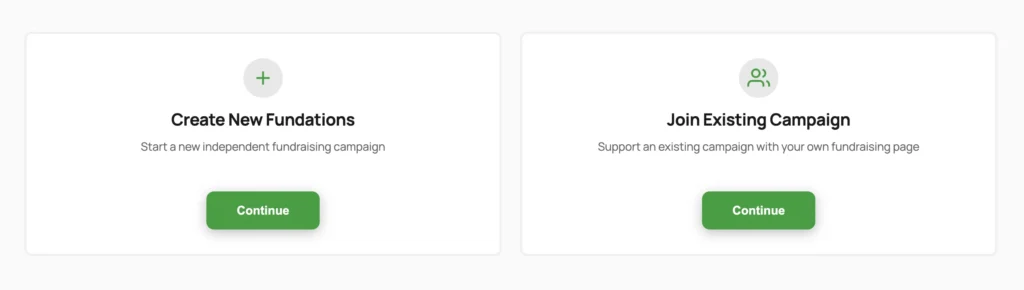
The Action Wizard is the frontend, multi-step form that supporters use to create a new fundraising page (called a “Fundation” or “action”). It runs on the auto-created Wizard page and requires no admin involvement for a typical submission. This is a free feature.
Why use this
Without the wizard, only WordPress administrators could create fundraising pages. The wizard lets any visitor, logged-in user, or guest create a page through a guided form, with automatic account creation, gallery upload, event assignment, and campaign joining all handled in one flow.
What it does
The wizard accepts a title, description, goal amount, end date, featured image, gallery images, and campaign or team assignment. On submission it:
- Validates and sanitises all fields.
- Creates a
get_fund_actionpost with statusactive. - Handles account creation or guest flow depending on the auth mode setting.
- Optionally assigns the action to an event (taxonomy term).
- Sends one or more confirmation emails.
- Redirects the creator to their new fundraising page.
Authentication modes
The setting get_fund_wizard_auth_mode controls how user accounts are handled:
| Mode | Behaviour |
|---|---|
allow_new (default) | Creates a WordPress account (fund_member role) for new email addresses. Existing users receive a welcome email with a password reset link. |
guest | No WordPress account is created. Contact details are stored as post meta. A guest confirmation email is sent containing a claim link so the creator can claim ownership later. |
In guest mode, no WordPress user account is created. Contact details are stored as _get_fund_guest_email, _get_fund_guest_first_name, _get_fund_guest_middle_name, _get_fund_guest_last_name, and _get_fund_guest_display_name.
Guest claim flow
When a guest creates an action, the plugin generates a 30-day claim token (_get_fund_claim_token) and stores an expiry timestamp (_get_fund_claim_token_expires). The claim email contains a link to the claim page with parameters get_claim_action, token, and email. Following that link lets the guest create an account and take ownership.
Gallery images
The wizard accepts multiple image uploads (gallery_images file field). Each file is validated for MIME type against the gallery settings allowed types, and the total count is capped by the max_images gallery setting. Files are uploaded via the WordPress media library and stored as an array of attachment IDs.
Event assignment
When the setting get_fund_event_creation is set to all_users, the wizard shows an event picker. The submitter can select an existing event by ID or enter a new event name (3 to 50 characters). If the name matches an existing term it is reused; otherwise a new term is created and assigned.
Category assignment
When Categories are enabled (get_fund_categories_enabled), the wizard shows a category dropdown, indented to show any nesting. Unlike events, the submitter can only select an existing category, never create one, since categories are admin-managed. The choice is stored in _get_fund_category_id.
URL structure
The action slug is generated from the title by default (original mode, free). Pro adds hash (26-character random slug) and combined (title + 15-character hash). If Pro is not active, hash and combined both fall back to original.
Featured image security
Uploaded featured images get a 24-character SHA-256-derived filename. MIME type must be image/jpeg, image/jpg, image/png, or image/webp. File size is capped at 5 MB.
How to use it
- Go to Fundations > Settings > Pages and confirm the Wizard page is installed.
- Link visitors to the Wizard page URL (for example, add it to your navigation menu).
- A visitor fills in the title, description, and other fields, then clicks Submit.
- The plugin creates the fundraising page and sends the appropriate emails.
- The visitor is redirected to the new page.
Settings and options
| Option key | Default | Description |
|---|---|---|
get_fund_wizard_auth_mode | allow_new | allow_new or guest — controls account creation behaviour |
get_fund_wizard_page_id | (auto) | Page ID of the wizard page |
get_fund_wizard_currency_symbol | € | Currency symbol shown in goal amount field |
get_fund_event_creation | admin_only | admin_only or all_users — who can assign/create events |
get_fund_url_structure | original | original (free), hash (Pro), combined (Pro) |
get_fund_welcome_email_enabled | true | Send welcome email on new account creation |
get_fund_confirmation_email_enabled | true | Send confirmation email after creating an action |
get_fund_guest_confirmation_email_enabled | true | Send guest confirmation with claim link |
What you can and cannot do
You can:
- Accept gallery image uploads during action creation.
- Allow guests to create actions without registering.
- Restrict event creation to admins only.
- Override form data and meta values with filters before saving.
- Customise the post slug format (Pro required for non-original modes).
You cannot:
- Use the wizard with a classic (non-block) theme.
- Enable hash or combined URL structures without Pro.
- Allow guests to re-enable children-disabled campaigns.
Troubleshooting
Wizard page shows 404. Go to Fundations > Settings > Pages and reinstall the wizard page. Then flush permalinks at Settings > Permalinks.
Guest claim email link expired. The claim token is valid for 30 days. After expiry the creator needs to contact the site admin to transfer ownership.
Images not uploading. Check that max_images in gallery settings is greater than zero and that the file is under 5 MB and is a JPEG, PNG, or WebP.
Welcome email sent to existing users. This is expected behaviour. Existing users receive a welcome email with a password reset link so they can regain access.
Developer reference
Actions
| Hook | Arguments | Description |
|---|---|---|
get_fund_wizard_user_created | int $user_id, string $email, string $first_name, string $last_name | Fires after a new WordPress user is created by the wizard. |
get_fund_action_created | int $post_id, array $data | Fires after the new action post is saved. |
Filters
| Hook | Arguments | Description |
|---|---|---|
get_fund_wizard_form_data | array $data | Sanitised form data before validation. |
get_fund_wizard_validation_errors | array $errors, array $data | Inject additional validation errors. |
get_fund_wizard_post_data | array $post_data, array $data | Modify wp_insert_post arguments before saving. |
get_fund_wizard_meta_values | array $meta_values, int $post_id, array $data | Modify meta key/value pairs before they are saved. |
get_fund_wizard_allowed_image_types | array $allowed_mime_types, int $post_id | Override allowed MIME types for the featured image upload. |
get_fund_wizard_upload_image | int $attachment_id, int $post_id, array $uploaded_file | Called after each image is uploaded. |
get_fund_wizard_redirect_url | string $url, int $post_id | Override the post-submission redirect URL. |
get_fund_wizard_campaign_query_args | array $args, string $search | Modify the WP_Query args for the campaign search. |
Meta keys saved on new actions
| Meta key | Description |
|---|---|
_get_fund_amount | Goal amount |
_get_fund_raised_amount | Raised amount (initialised to 0) |
_get_fund_status | active |
_get_fund_structure_type | individual, join_team, or create_team |
_get_fund_creator_id | WordPress user ID of the creator |
_get_fund_end_date | End date (YYYY-MM-DD) |
_get_fund_creator_anonymous | Whether creator is shown anonymously |
_get_fund_children_disabled | Prevents new child actions |
_get_fund_campaign_id | Parent campaign post ID (if joining a campaign) |
_get_fund_team_id | Team post ID (if joining a team) |
_get_fund_guest_email | Guest email (guest mode only) |
_get_fund_guest_first_name | Guest first name (guest mode only) |
_get_fund_guest_middle_name | Guest middle name (guest mode only) |
_get_fund_guest_last_name | Guest last name (guest mode only) |
_get_fund_guest_display_name | Guest display name (guest mode only) |
_get_fund_claim_token | Claim token (guest mode only) |
_get_fund_claim_token_expires | Claim token expiry timestamp (guest mode only) |