
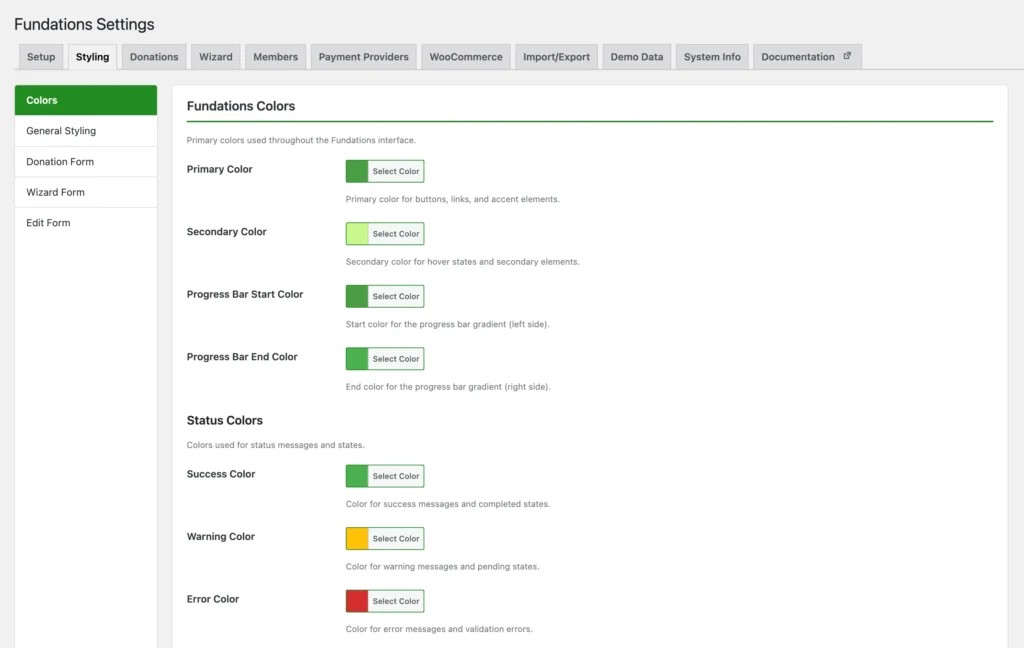
Fundations outputs all visual styling as CSS custom properties (CSS variables) that are applied globally to both the frontend and the admin. Colors, spacing, and typography can be changed from the settings panel without editing any CSS. This is a free feature.
Why use this
Block themes control their own color palettes, but Fundations blocks use additional design tokens for progress bars, status badges, form fields, and fundraising-specific UI. The CSS variable system lets you match the fundraising blocks to your site’s brand without touching stylesheets.
What it does
On both wp_head (frontend) and admin_head (admin), the plugin outputs a block containing CSS custom properties derived from stored options. These variables are used throughout Fundations blocks and templates.
Color variables
| Option key | Default | CSS variable |
|---|---|---|
get_fund_primary_color | #4a9d44 | --gf-primary |
get_fund_secondary_color | #006f9e | --gf-secondary |
get_fund_progress_color | #4a9d44 | --gf-progress |
get_fund_progress_color_end | #ff6b6b | --gf-progress-end (gradient end) |
get_fund_text_color | #333333 | --gf-text |
get_fund_text_muted_color | #666666 | --gf-text-muted |
get_fund_text_primary_color | #1a1a1a | --gf-text-primary |
get_fund_text_secondary_color | #333333 | --gf-text-secondary |
get_fund_success_color | #4caf50 | --gf-success |
get_fund_warning_color | #ffc107 | --gf-warning |
get_fund_error_color | #d32f2f | --gf-error |
get_fund_bg_light_color | #f8f9fa | --gf-bg-light |
get_fund_border_color | #e0e0e0 | --gf-border |
get_fund_bg_white_color | #ffffff | --gf-bg-white |
get_fund_bg_gray_color | #f5f5f5 | --gf-bg-gray |
get_fund_border_light_color | #f0f0f0 | --gf-border-light |
get_fund_border_medium_color | #e0e0e0 | --gf-border-medium |
get_fund_border_dark_color | #dddddd | --gf-border-dark |
get_fund_shadow_color | #000000 | --gf-shadow |
Spacing variables
Each spacing size has a companion _unit option that accepts px, %, em, rem, vh, or vw.
| Option key | Default |
|---|---|
get_fund_spacing_xs | 4px |
get_fund_spacing_sm | 8px |
get_fund_spacing_md | 16px |
get_fund_spacing_lg | 24px |
get_fund_spacing_xl | 32px |
Amount formatting
| Option key | Default | Description |
|---|---|---|
get_fund_amount_decimals | 0 | Number of decimal places for displayed amounts. Automatically increases to 2 if the amount has a fractional part. |
get_fund_wizard_currency_symbol | € | Currency symbol used in wizard, frontend edit form, and dashboard. |
Settings export and import
All Fundations settings can be exported as a JSON file and imported on another site. Use Fundations > Settings > Export / Import.
Color reset
A Reset Colors button in the color settings panel triggers the AJAX handler get_fund_reset_color_settings, which restores all color options to their defaults.
How to use it
- Go to Fundations > Settings > Appearance.
- Change any color using the color picker.
- Adjust spacing values if needed.
- Click Save Settings.
- The changes take effect immediately on the frontend and admin.

What you can and cannot do
You can override any CSS variable further in your theme's stylesheet using the same variable name. You can also export settings and import them on a staging or production site, or reset all colors to defaults in one click.
You cannot change the CSS variable names themselves, as they are hardcoded in block templates and stylesheets. Per-block colors are not configurable from this panel; use block attributes in the block editor for that.
Troubleshooting
Color changes are not appearing. Check for a caching plugin serving a stale . Purge the cache or temporarily disable caching and reload.
Import fails. Confirm the JSON file was exported from a Fundations installation and has not been modified. The import handler validates the JSON structure.
Developer reference
Filters
| Hook | Arguments | Description |
|---|---|---|
get_fund_currency_format | string $formatted, float $amount, int $decimals, string $decimal_sep, string $thousands_sep | Override the formatted currency string. |
get_fund_amount_decimals | int $decimals, float $amount | Override the number of decimal places for a specific amount. |
Example: enforce two decimal places
add_filter( 'get_fund_amount_decimals', function( $decimals, $amount ) {
return 2;
}, 10, 2 );