
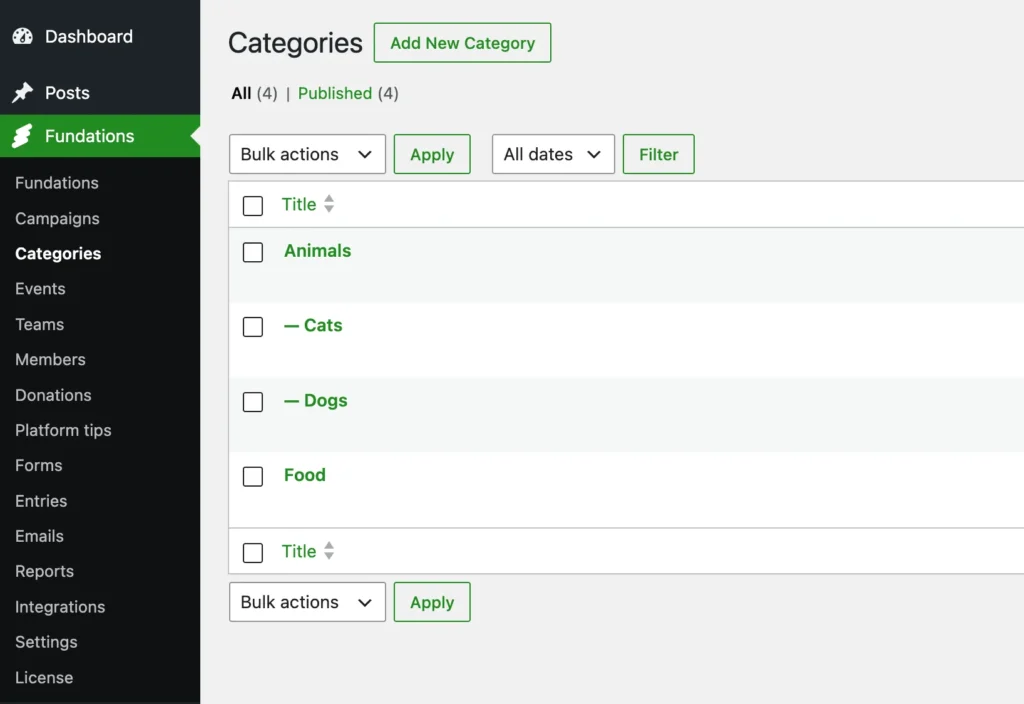
Categories group fundraising pages by cause or theme: Animals, Education, Disaster relief. A category can nest inside another, so Animals can contain Dogs, Cats, and Birds. Categories are a free feature, modeled on Events, and are turned off until you enable them.
Why use this
Events group pages by occasion (a gala, a marathon). Categories group them by subject, and unlike events they nest. A supporter browsing a large platform can drill from a broad cause down to a specific one, and the filter bar can narrow any archive to a single category and everything under it.
Categories are admin-managed. Site administrators create and organise the category tree; supporters only ever pick from it. This keeps the taxonomy clean, so you do not end up with ten spellings of “Animals” the way freely-typed values tend to grow.
What it does
get_fund_category is a hierarchical custom post type. It is:
- Hierarchical (parent/child via
post_parent, so categories nest to any depth). - Public, with single and archive templates.
- Shown in the admin under Fundations > Categories, between Campaigns and Events, when the feature is enabled.
- Registered in the REST API with base
get_fund_categories. - Rewrite slug
fund-category(so a category lives at/fund-category/animals/). The slug isfund-category, notcategory, to avoid colliding with WordPress core’s Category base. - Supports a title, editor content, featured image, excerpt, and page attributes (for ordering and nesting).
A fundraising page belongs to at most one category, stored in the _get_fund_category_id meta. There is no inheritance chain, unlike events: a page’s category is exactly the one set on it.
Turning the feature on
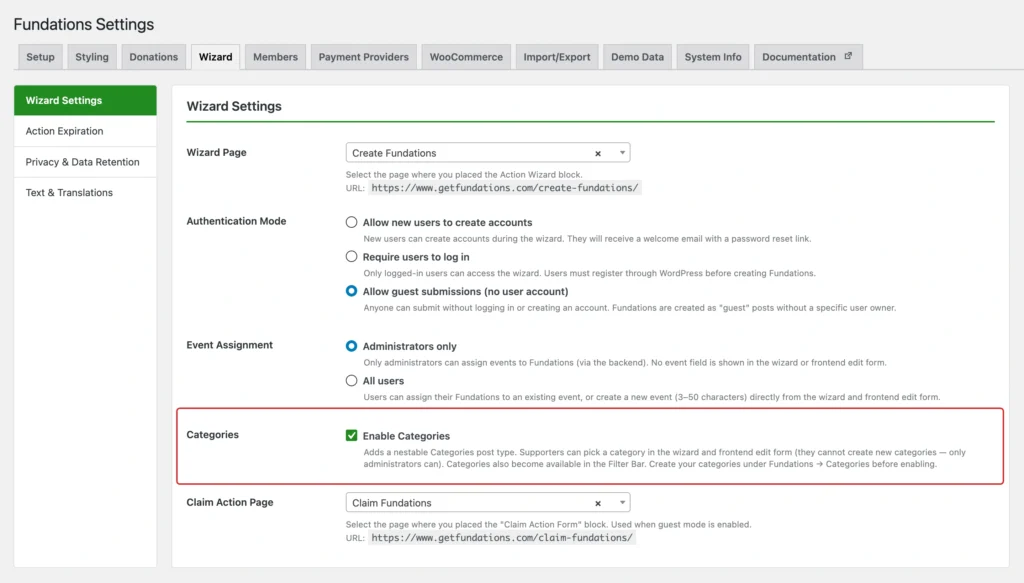
Categories are gated by the get_fund_categories_enabled option, which is off by default. Enable it under Fundations > Settings > Wizard. While it is off:
- The Categories admin menu is hidden.
- The category field does not appear in the wizard, the frontend edit form, or the admin edit screen.
- The filter bar’s category control does not render.
The get_fund_category post type itself is always registered, even when the feature is off, so any category URLs and stored assignments stay valid if you toggle it.
How an archive scopes to a category
When a visitor opens a category page, the fundations grid shows every page in that category and all of its descendants. Fundations walks the post_parent tree from the current category down (with a depth guard), collects every descendant category, and queries for fundations whose _get_fund_category_id is any of them. So opening Animals shows the pages tagged Animals, Dogs, Cats, and Birds together; opening Dogs shows only the Dogs pages.
Who can create categories
Only administrators, always. There is no “all users” mode as there is for events. Supporters select an existing category from a dropdown; they can never create one. This is enforced everywhere the category field appears:
| Where | Behaviour |
|---|---|
| Action Wizard | A category dropdown (indented to show nesting) appears when the feature is on. Select only, no create. |
| Frontend edit form | The same select2 dropdown, pre-selected to the page’s current category. Select only. |
| Admin edit screen | A select2 category picker in the Fundations Details meta box, like the Event picker. |
How to use it
Enable categories and build the tree
- Go to Fundations > Settings > Wizard and turn on Categories. Save.
- Go to Fundations > Categories (it now appears between Campaigns and Events).
- Click Add New, give the category a title, optional description, and featured image, and publish.
- To nest a category, set its Parent under Page Attributes (for example, create Dogs with the parent Animals).
Assign a page to a category
- As an admin: open a fundation, and in the Fundations Details meta box choose a category from the picker.
- As a supporter: the category dropdown appears in the Action Wizard when creating a page, and in the frontend edit form afterwards.
Browse and filter by category
- Each category has its own archive at
/fund-category/, listing every fundation in it and its sub-categories./ - With Fundations Pro, the Filter Bar adds a category dropdown that narrows the Fundations, Events, and Organisations archives to a chosen category.
What you can and cannot do
You can build a nested category tree of any depth, give each category its own page with content and an image, assign one category per fundraising page, and let supporters pick from the tree in the wizard and edit form.
You cannot assign more than one category to a page, and supporters cannot create categories: creation is admin-only by design. Categories do not aggregate their own combined total the way an event does; a category page is a filtered listing, not a roll-up.
Troubleshooting
The Categories menu is missing. The feature is off. Turn on Categories under Settings > Wizard.
Category field does not appear in the wizard or edit form. Confirm the feature is enabled, then clear any page cache.
Category page returns a 404. Flush permalinks at Settings > Permalinks > Save Changes. The category rewrite slug is fund-category.
A category page is missing pages that should be under it. Scoping includes descendants of the current category only. Check that the pages carry the right category and that child categories have the correct parent set under Page Attributes.
Developer reference
| Symbol | Type | Notes |
|---|---|---|
get_fund_category | post type | Hierarchical, REST base get_fund_categories, rewrite slug fund-category. Always registered. |
_get_fund_category_id | post meta | The single category a fundation is assigned to. |
get_fund_categories_enabled | option | false by default. Gates the admin menu, the selectors, and the filter control. |
Get_Fund_Post_Types::categories_enabled() | method | Reads the option; the canonical gate used across FREE and Pro. |
The scoping helpers live in includes/class-get-fund-block-editor.php: get_category_descendant_ids() walks the parent tree, get_category_fundation_ids() returns every fundation in a category and its descendants, and filter_category_fundations_query() applies that to the query on a category single template.