
The demo data generator fills a fresh install with a complete, working peer-to-peer system: events, campaigns, teams, fundraisers, donations, and fundraiser accounts. It is the fastest way to see what Fundations looks like with real content, and to test your theme and templates against realistic data. One button generates it, one button removes every trace of it. Added in 2.9.0 as a free feature, with a Pro layer on top.
Why use this
A brand new Fundations site has nothing to look at: no campaigns, no progress bars, no donor lists. Building a representative test set by hand takes a long time and is easy to get wrong. The generator creates a believable structure in seconds so you can preview pages, style blocks, and check totals, then clean it all up before you go live. It is the same idea GiveWP and similar plugins use to demonstrate a fresh install.
What it does
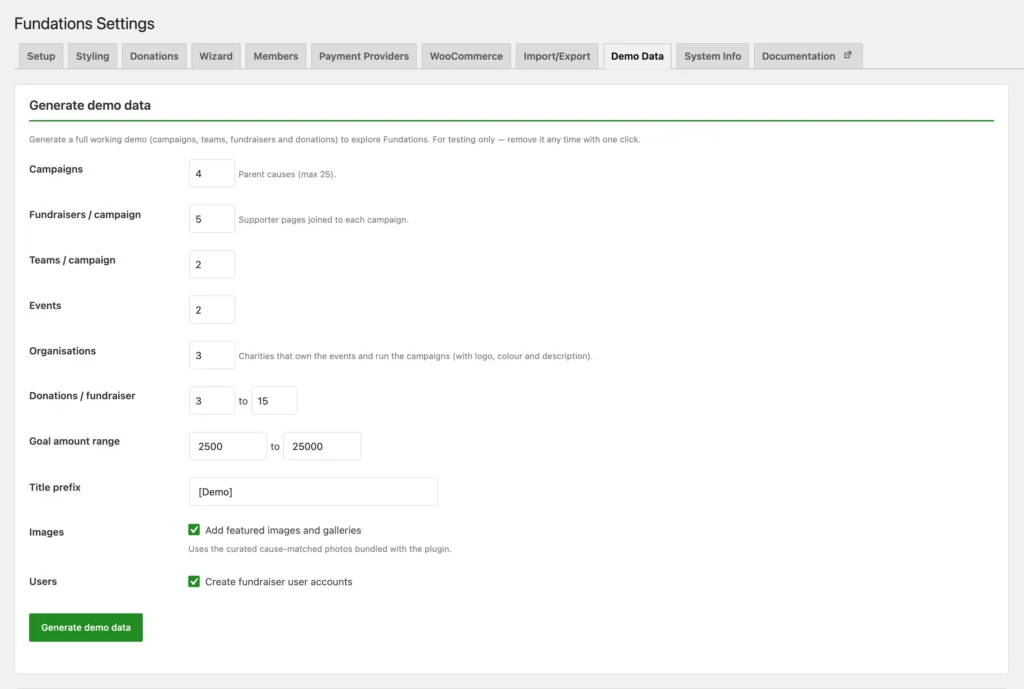
The generator lives at Fundations > Settings > Demo Data. It writes real database rows, not block placeholders, so the content behaves exactly like content you would create yourself. Everything it makes is tagged so it can be removed cleanly.
It creates:
- Events (
get_fund_event), each owned by the current user. - Campaigns (
get_fund_actionwith the_get_fund_is_campaignflag), with a goal, status, end date, short description, featured image, and an event. - Teams (
get_fund_team) joined to a campaign. - Fundraisers (child
get_fund_action), joined to a campaign and sometimes a team. - Donations, written to the custom donations table through
Get_Fund_Donation_Model::create()with a paid status, plus the matching donation post. Because they go through the model, they update the stats cache and show up in Donations, Entries, and every raised-amount block. - Fundraiser accounts (
fund_memberusers), when the create-users option is on.
Options
| Option | Default | Range |
|---|---|---|
| Campaigns | 4 | 0 to 25 |
| Fundraisers per campaign | 5 | 0 to 20 |
| Teams per campaign | 2 | 0 to 10 |
| Events | 2 | 0 to 10 |
| Donations per fundraiser | 3 to 15 | 0 to 100 |
| Goal range | 2,500 to 25,000 | from 100 |
| Title prefix | [Demo] | text |
| Create images | on | toggle |
| Create users | on | toggle |
The title prefix is how you spot demo content at a glance, and it is part of why cleanup is safe.
Images
When the images option is on, each campaign and fundraiser gets a featured image and a small gallery. Images come from a set of curated public-domain photos bundled with the plugin in public/demo-images/, organised by cause: animals, disaster, education, food, forest, homeless, medical, and water. The cause of the campaign decides which folder is used, so the pictures match the content. If a bundled image is missing, the generator draws a colored placeholder with GD instead, so it never depends on a network call. Turn the option off to skip images entirely.
Cleanup
Every object the generator makes is tagged with _get_fund_demo meta and its ID is recorded in the get_fund_demo_objects option, grouped into posts, donations, users, and attachments. The Delete all demo data button shows a count of what exists and removes exactly those tracked IDs after you confirm. Donations are deleted through the donation model so the stats recalculate. Nothing outside the tracked set is touched, so your real content is never at risk.
The Pro layer
When Pro is active, it adds to the generated set through the get_fund_demo_after_generate hook rather than changing the free generator. Pro gives roughly a third of the demo donations a platform tip (5, 10, or 15 percent, carved out of the existing amount) so the tip collection features have something to show. Pro cleanup needs nothing extra, because the tips sit on demo donations that the free cleanup already removes.
How to use it
- Go to Fundations > Settings > Demo Data.
- Set the counts and ranges, or leave the defaults.
- Decide whether to create images and user accounts.
- Click Generate demo data.
- Browse the new campaigns, events, and fundraiser pages on the front end.
- When you are done, click Delete all demo data and confirm.
What you can and cannot do
You can generate a full P2P structure with realistic donations and stats, control how much of each thing is made, match images to the cause, and remove everything in one click without harming real content.
You cannot target the generator at existing campaigns: it always creates its own. It is a tool for staging and demos, not for seeding production. Run it on a test site, or clean it up before launch.
Troubleshooting
Donations do not show in totals. The generator writes through the donation model, which needs the custom donations table to be ready. If the table has not been created yet, let the database upgrade run (it happens on load) and regenerate.
Images are plain colored boxes. The bundled photo for that cause was not found, so GD drew a placeholder. This is the intended fallback and does not affect anything else.
Cleanup left something behind. Cleanup removes only the IDs recorded in get_fund_demo_objects. If you deleted some demo posts by hand first, their IDs may already be gone from the tracking option. Anything still tagged with _get_fund_demo can be found and removed manually.
Developer reference
| Hook | Type | Notes |
|---|---|---|
get_fund_demo_after_generate | action | Fires after the free generator finishes. Pro uses it to add tips. |
get_fund_demo_after_cleanup | action | Fires after demo data is deleted. |
_get_fund_demo | post/user meta | Marks an object as demo content. |
get_fund_demo_objects | option | Tracks every generated ID by type. |
The generator is Get_Fund_Demo_Generator in includes/class-get-fund-demo-generator.php.